Most LLM projects start the same way: one OpenAI API key, one SDK, one model. Almost every tutorial on YouTube shows that same setup, and I've started almost every project this way too. For a prototype it's the right call. At that stage you're trying to find out whether the product is worth building, not build infrastructure you might throw away later.
That setup can survive into production too, as long as the project stays simple. A single agent, a small classifier, a report generator: OpenAI's uptime is good enough that you rarely think about it. It stops being enough once availability, latency and cost start to matter, and once you realise the infrastructure underneath you isn't in your control. That's the point to start thinking about alternatives.
Take a multi-agent system. Once you're past a single call you usually end up with several agents doing different jobs, and they don't all need the same model. In a coding setup you might run the reviewer on GPT-5, the writer on Claude Opus, and the intent classifier on a small Llama or a custom model you host yourself. The specific models don't matter. What matters is that a real production system ends up spanning several providers and models by design, and keeping it available means having fallbacks for each of them.
Then there are the failures you'll hit regardless of how many agents you run. A provider starts rate limiting your requests. A user sends something that exceeds the context window. A model gets deprecated out from under you. None of these are rare, and each one takes down part of your traffic if you only have one path wired up.
Here's how I'd make that setup production ready, step by step.
Start with a retry
The first instinct is to add a retry. Wrap the call in exponential backoff: when it fails, wait a moment and try again, waiting longer after each attempt.
That works for a dropped connection or a one-off timeout. It does nothing when the provider itself is struggling. If OpenAI is returning 429s or 5xxs because it's overloaded, every retry lands on the same overloaded service, so retrying doesn't change the outcome.
At scale it makes things worse. Every client runs the same retry at the same moment, each attempt adds load to a service that's already failing, and a partial outage can turn into a full one. Retries only work if they have somewhere else to go, and that's what a fallback gives them. Instead of calling the same provider again, you send the request to another one: OpenAI is down, so it goes to Anthropic; Anthropic is rate limited, so it tries Gemini. Your application doesn't need to know which provider answered.
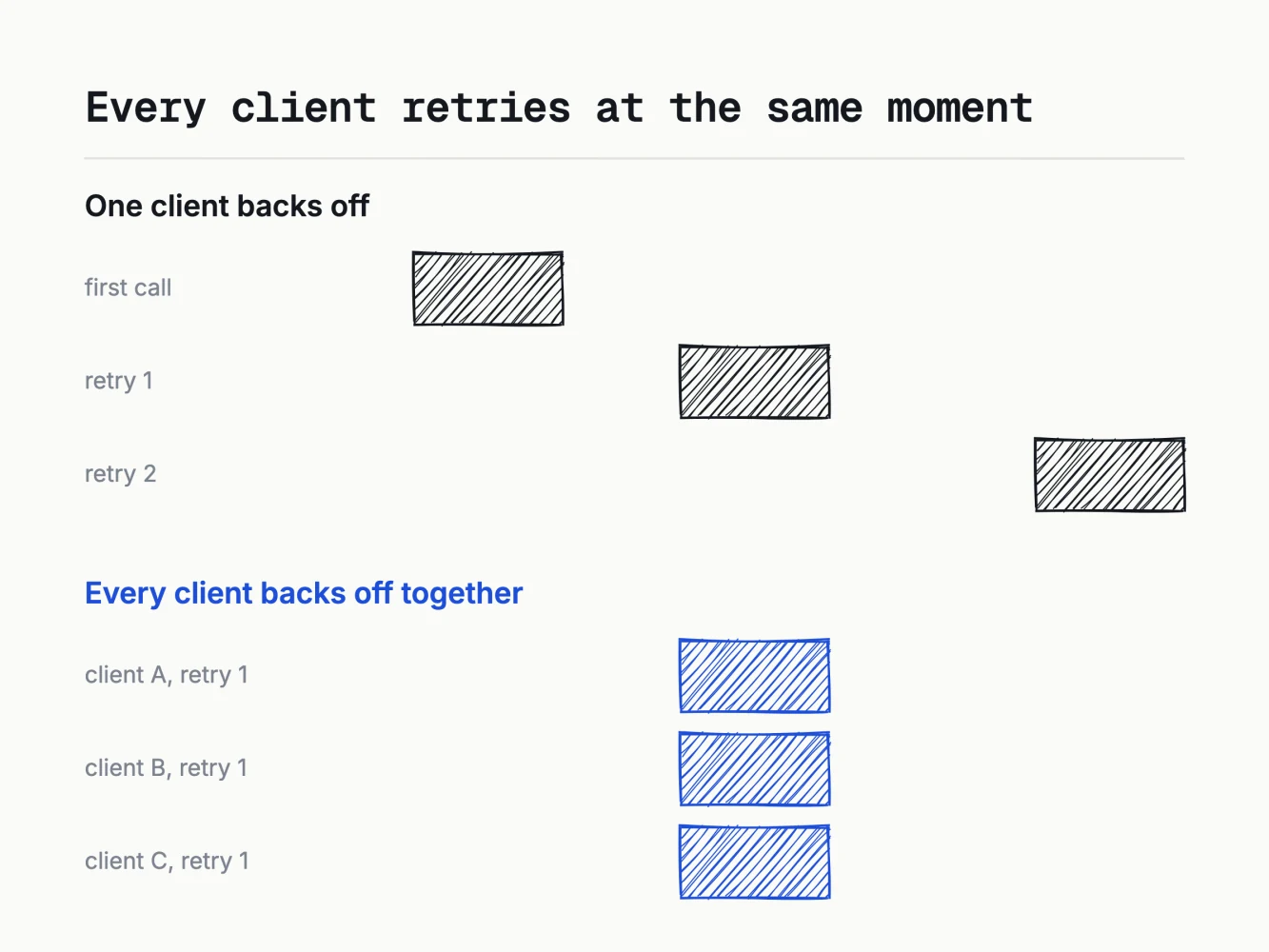
Clients that failed together retry together.
Putting a gateway in front
A fallback means every request has to be able to change its destination, and doing that by hand across three providers, each with its own SDK and its own retry semantics, gets messy fast. This is what an API gateway is for. It sits between your application and your model providers, so instead of calling OpenAI or Anthropic directly, every request goes through the gateway first and the gateway decides where it goes. It can retry, route to another provider, cache responses, enforce rate limits, and centralise logging and metrics, without changes to your application code. Plenty of gateways advertise unified APIs, hundreds of models and dashboards on top of that. Those are useful, but the feature that matters in production is routing: sending each request wherever is healthy right now instead of to a single provider hardcoded into your application.
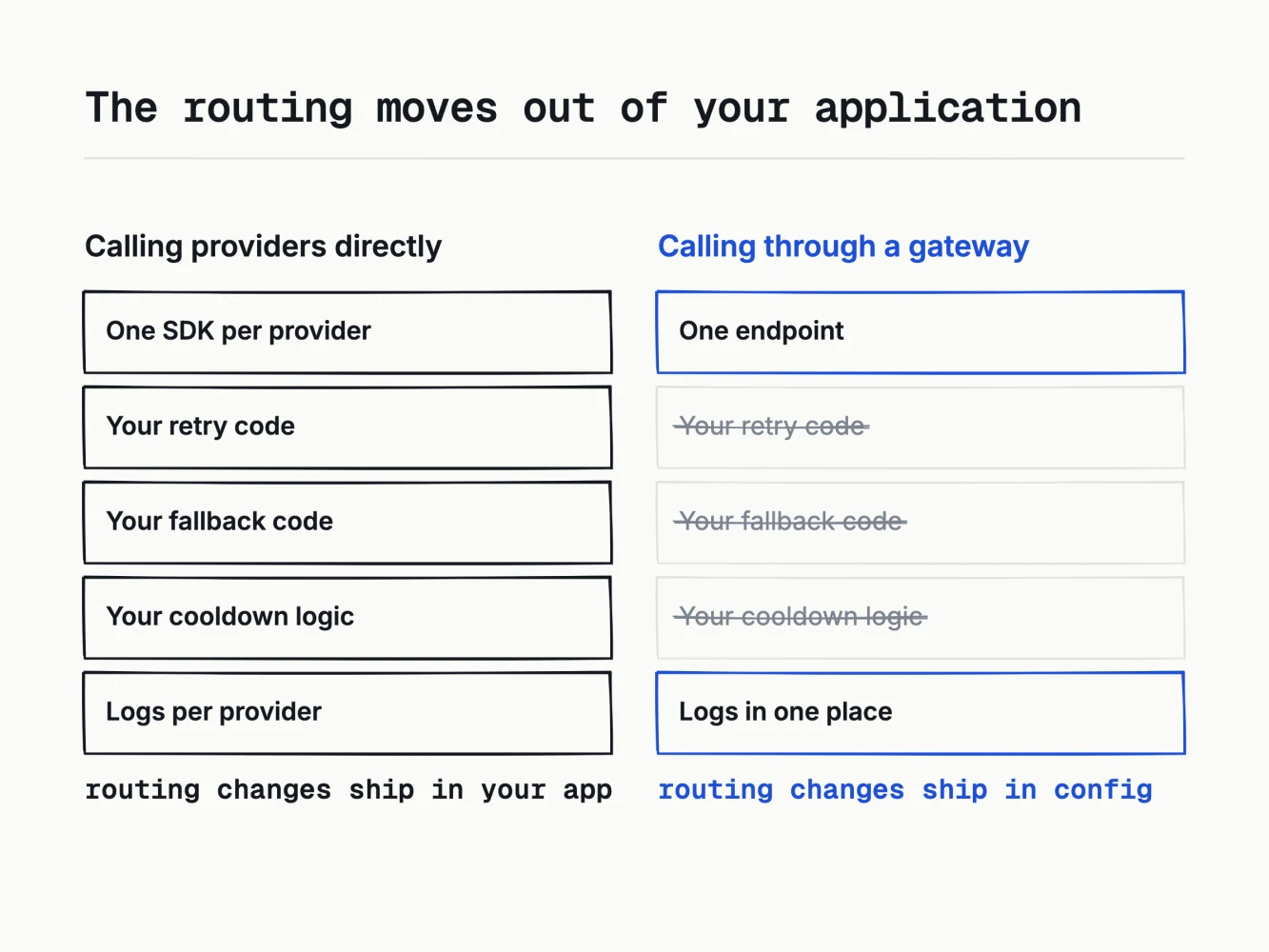
The routing becomes config, not code you maintain.
I ran Portkey for this. A fallback there is a config object attached to the request: an ordered list of targets and the status codes that move you to the next one. Writing the config is straightforward. The harder part is deciding when a fallback should fire.
Choosing on_status_codes
{
  "strategy": {
    "mode": "fallback",
    "on_status_codes": [429, 500, 502, 503]
  },
  "targets": [
    { "override_params": { "model": "@openai-prod/gpt-4o" } },
    { "override_params": { "model": "@anthropic-prod/claude-sonnet-4-5" } }
  ]
}
The list of providers isn't the part that matters, on_status_codes is. By default Portkey falls back on any non-2xx response, which sounds reasonable until you think about a 400. A 400 means your request is wrong: a missing parameter, a blown context window, a schema that won't validate. It fails on the second provider for the same reason it failed on the first, so falling back sends a broken request to two providers instead of one. You double your latency, double your upstream calls, and still fail. The same goes for most client-side errors.
So I fall back only on the failures that point at the provider, not at my own request: 429 for rate limits, and 500, 502 and 503 for server errors. Those are the cases where trying another provider has a real chance of working. Everything else should fail immediately, so you notice the bug and fix it instead of masking it behind a second call.
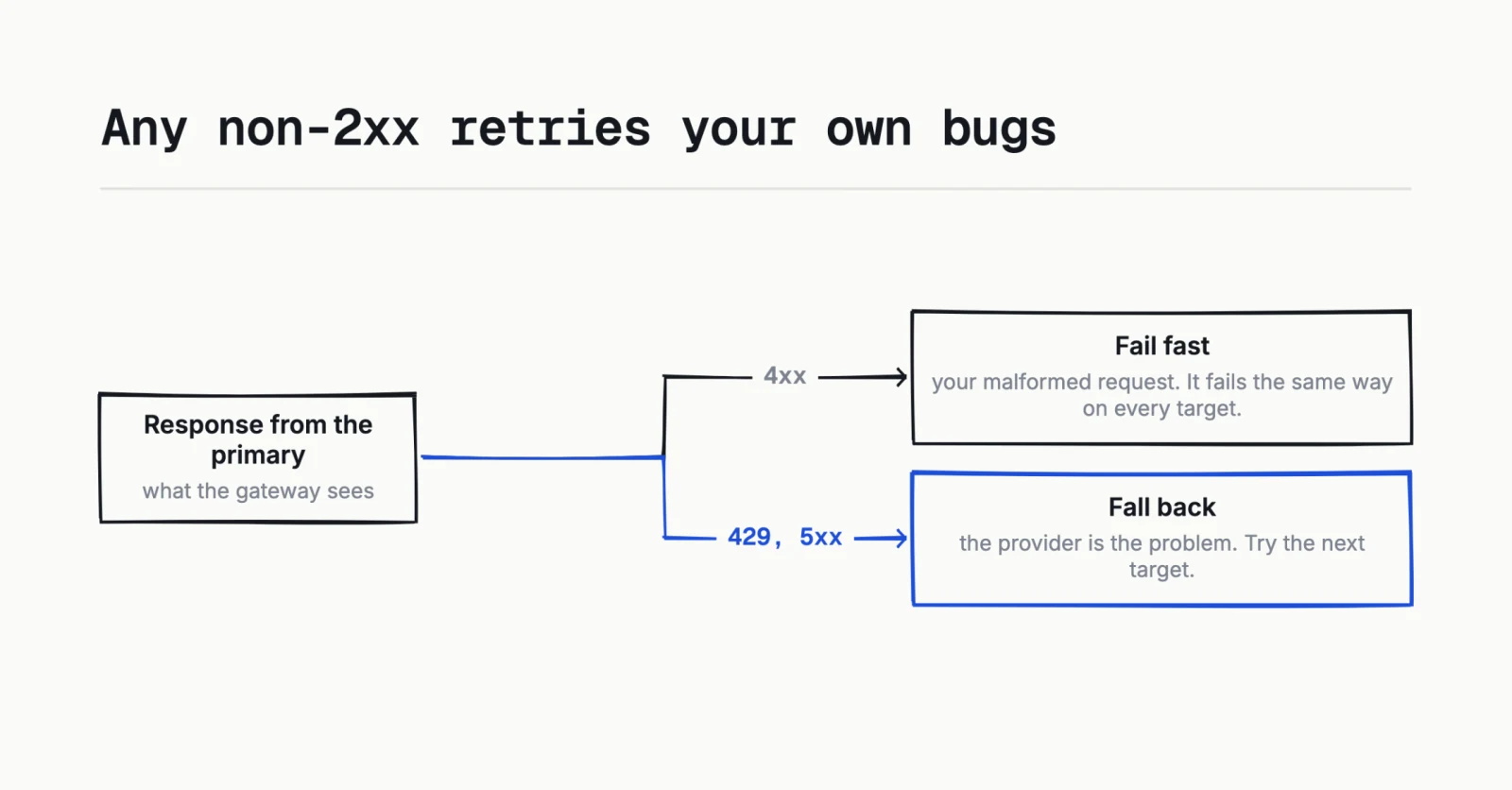
Only 429 and 5xx are worth trying elsewhere.
Fallbacks need cooldowns
Fallbacks fix one problem and add another. Say your primary provider goes down. The first request fails and falls back. So does the second, and the third, and every one after, because they all start by calling the provider you already know is down. Users still get an answer, but each request pays for one failed upstream call first, which during an outage is a lot of wasted calls and added tail latency.
Cooldowns fix that. Once a provider fails enough times, the gateway stops sending it traffic for a while and routes straight to the healthy ones. The first few requests detect the outage, and the rest skip it. In LiteLLM the defaults are a five second cooldown after three failures in a minute, and it also cools a provider down on a 429.
Cooldowns mattered more than the fallbacks did. A fallback still calls the down provider first on every request; a cooldown stops that after the first few.
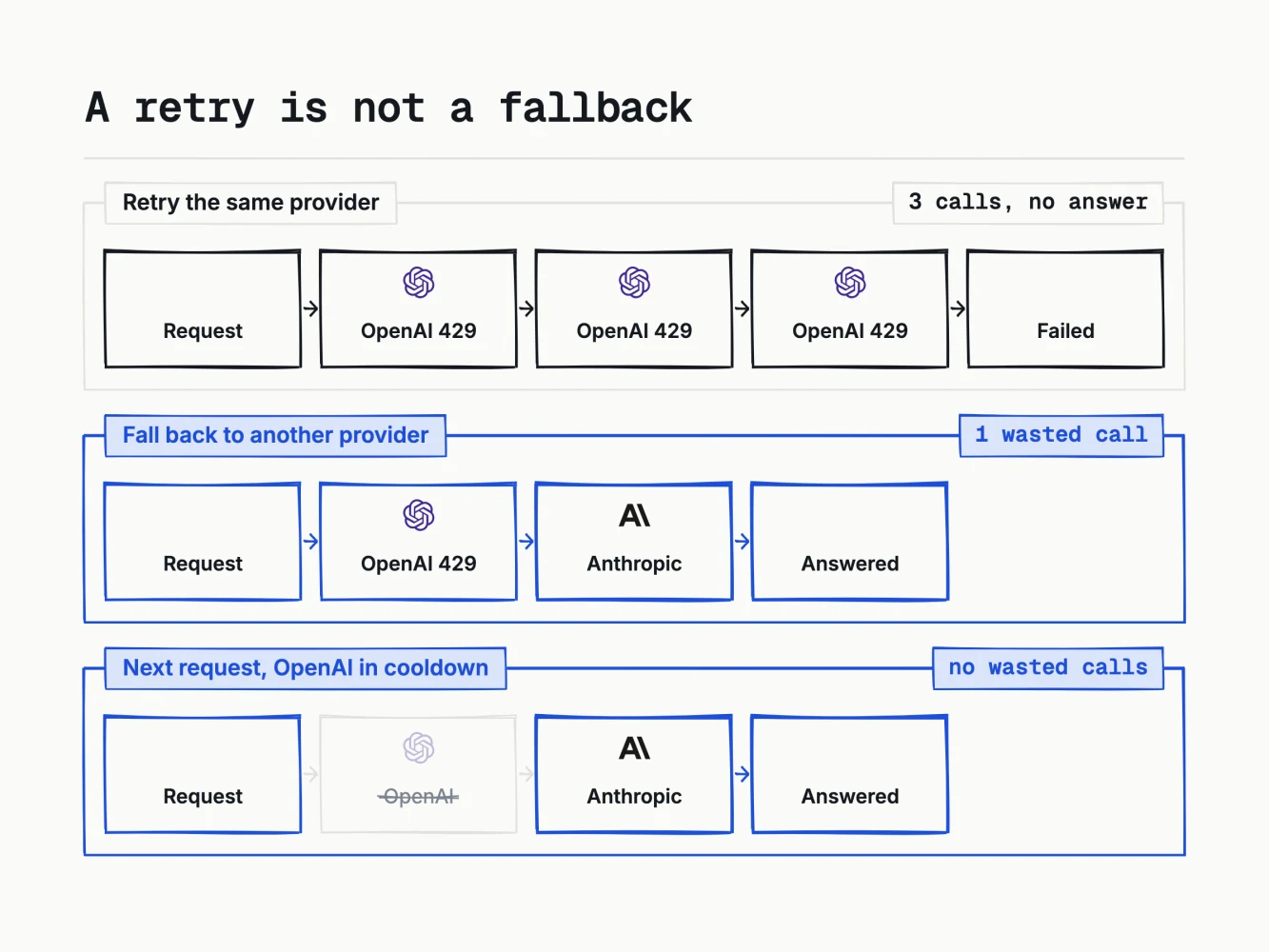
The cooldown is what removes the wasted call.
What changes when the fallback fires
Another thing I underestimated was assuming the second provider would return roughly what the first would have. It doesn't. Failing from one model to another changes what your application receives, in ways that are easy to miss.
Output distribution changes. A prompt tuned on one model won't produce equivalent results on another, and that shows up as quality complaints from users, not errors in your logs, so it can go unnoticed for a while. Structured output is the worst case. If you depend on JSON mode, function calling or a strict schema, the fallback has to support the same contract, and when it doesn't you get a parse error in your own code instead of a clean 500 from upstream.
Cost and tokenisation differ too, so your per-request cost changes during a fallback. The context window can also be smaller, so a request that fits your primary model may not fit the fallback. Test the fallback like a real path: run your eval set against it, not just the primary. Otherwise you don't know whether it works.
Simple and semantic caching
A gateway also gives you a cache, which is the biggest cost saving available. A simple cache is an exact match on the request body. A semantic cache matches on similarity, so "who is the US president" can hit an entry made by "tell me who is the president of the US". I haven't used semantic caching in production, so this comes from the docs rather than experience. One line in Portkey's docs is easy to miss:
The system prompt is ignored, changing it does not affect cache hits.
In a RAG application the system prompt is where the retrieved chunks go, often with the tenant identifier and the user's role. So take two users on different accounts asking the same question in the same words. Their user messages match, the cache returns a hit, and the system prompts, which carry different documents and different entitlements, are never compared. That's a cross-tenant leak caused by a caching feature, and it's documented behaviour rather than a bug.
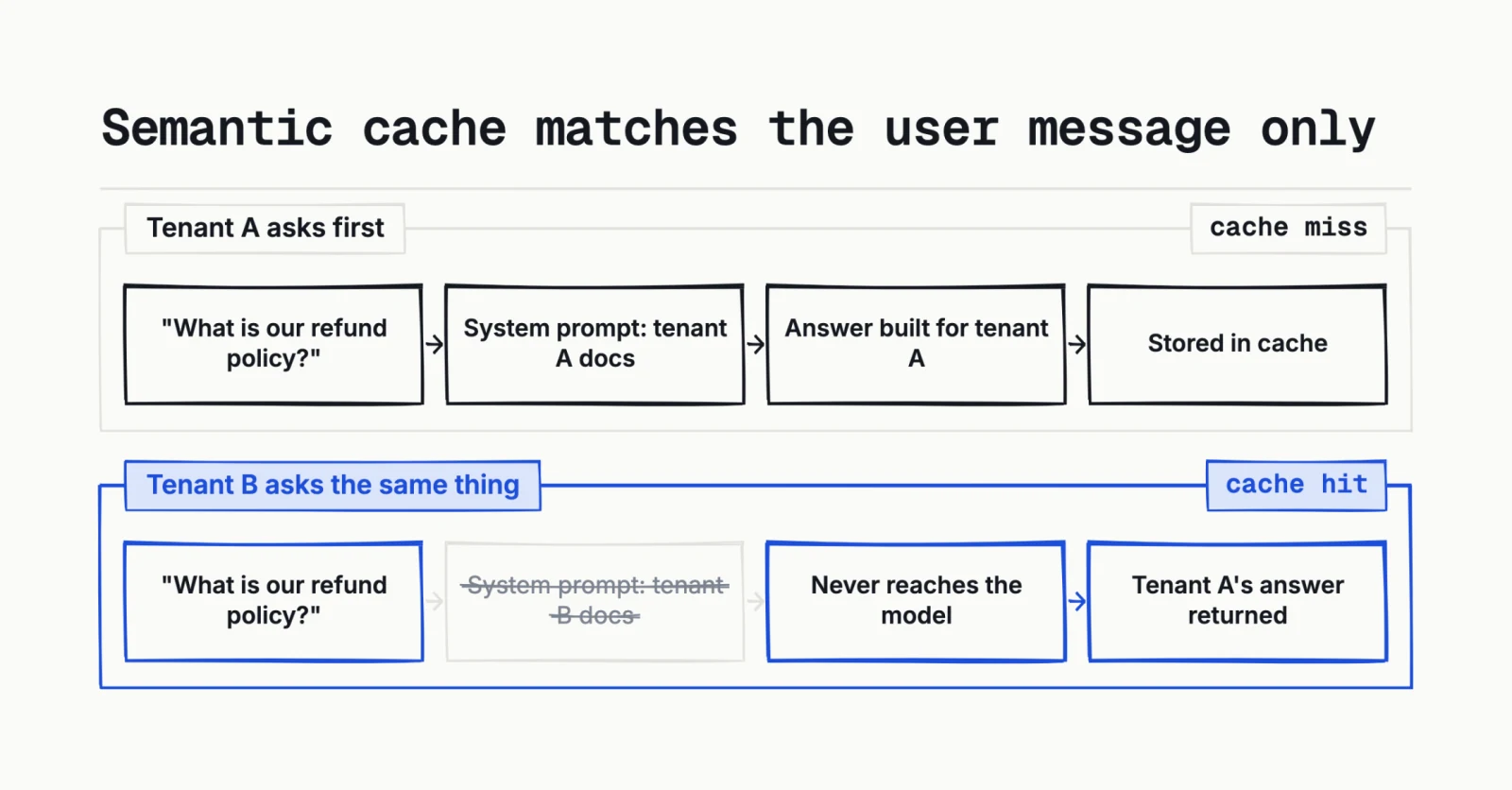
The system prompt is not part of the cache key.
The same docs note that semantic cache only applies under 8,191 tokens and four messages or fewer, which rules out most real conversations anyway.
Simple caching is safe to turn on broadly. I'd only use semantic caching where the entire meaning of the request lives in the user message. If anything that decides who may see an answer sits in the system prompt, semantic caching can return one user's response to another, and nothing in your metrics will flag it.
The gateway is now a dependency
Now the trade-off. The whole point was to add fallbacks, but the gateway itself is one more thing that can fail, and this one every request goes through. If it's down, the healthy providers behind it don't help.
That's not a reason to skip it. Trading a dependency you can't influence for one you can is usually worth it. But you now have two ways to run it, and both have a cost. A managed gateway means their incidents are your incidents, so you've swapped one status page for two. Self-hosting means you own the uptime, and a self-hosted gateway is a real service to run, scale and get paged about at 3am.
So the gateway needs its own fallback, and this is the part I'm least sure about. The idea I keep coming back to is running a managed gateway as the primary and a self-hosted one alongside it, then routing to the self-hosted one if the primary fails. I haven't built this, and I don't know if it's the right shape: you're now keeping two gateways in sync, and the failover between them is its own thing to get right. The simpler option is to fall back to calling a provider directly when the gateway is unreachable, or to just accept it as a hard dependency. Whichever you pick, decide it up front rather than during the first outage.
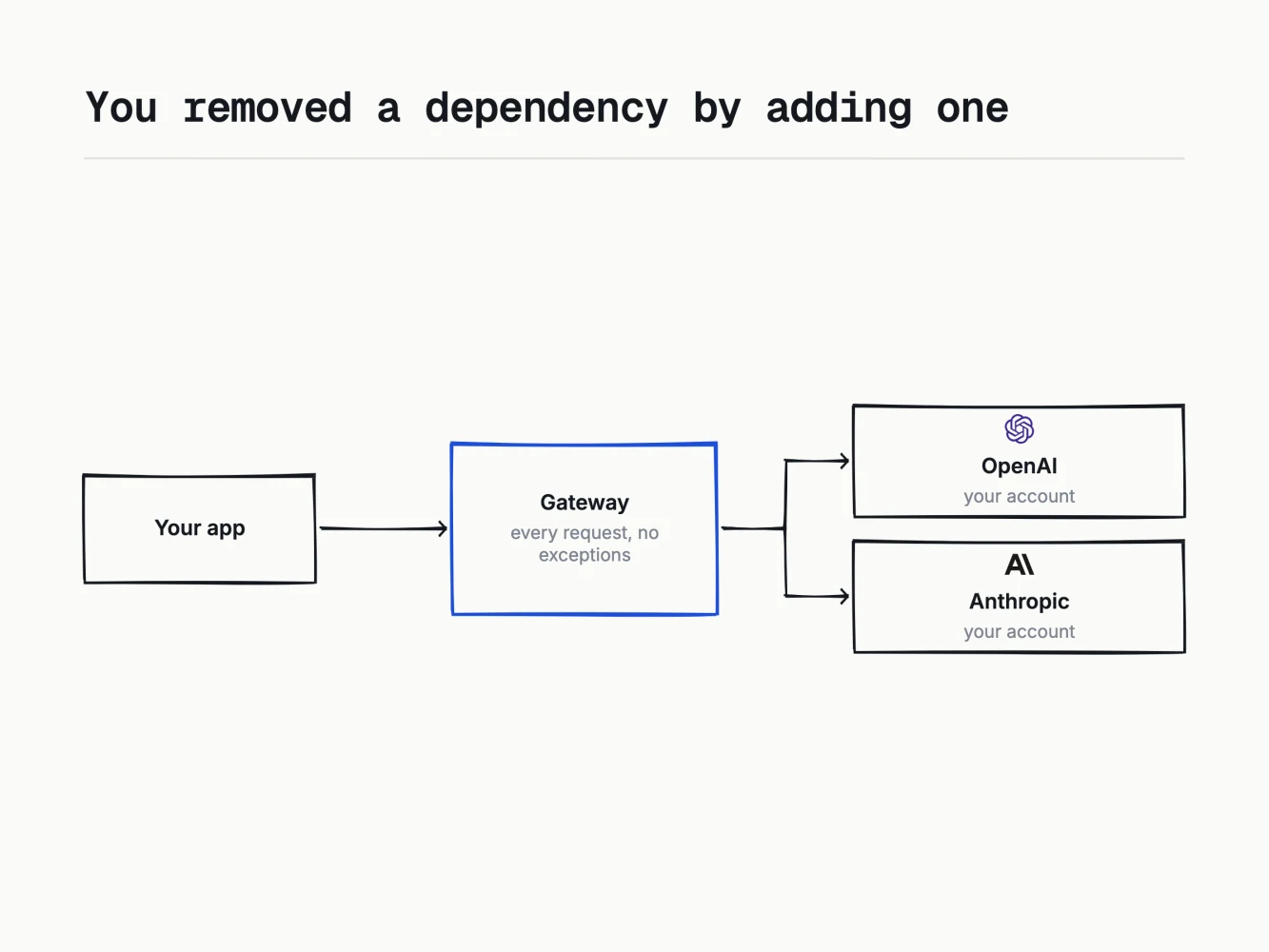
The gateway's uptime is now your uptime.
Portkey's gateway is open source, TypeScript and MIT licensed, so managed versus self-hosted is a real choice inside one product. I ran the managed one. At the size I was working at, one more service to operate was worse than one more status page to watch.
What it costs
The trade-off is latency. You've added a network hop to every LLM call, on a pipeline that already spends time reaching a provider. Portkey's repository claims under 1ms for the gateway itself, but that's the process itself, not the network round trip to wherever it runs, which is what shows up in your p99. That number depends on your own deployment, and I haven't benchmarked it on my stack, so I don't have a measured figure here. What you get in return is surviving a provider incident without shipping a deploy, and caching offsets some of it.
Practical takeaway
In the early phases you don't need a gateway. You need one once you need high availability, which is most production systems, but not on day one. If that's not you yet, skip this and spend the effort elsewhere.
When you do reach for one:
- Add it before you need it. Once a provider is failing, you can't safely ship the change that adds a gateway.
- Start with fallbacks. Set on_status_codes to 429 and the 5xxs so your own 400s fail fast instead of hitting two providers.
- Turn cooldowns on at the same time. Without them a fallback still pays for a failed call on every request during an outage.
- Run your eval set against the fallback provider before you trust it. A fallback your code can't parse is worse than a clean failure.
- Enable simple caching freely. Keep semantic caching away from anything where the system prompt carries tenant or permission context.
- Decide up front what happens when the gateway itself is unreachable.
References I used
- LiteLLM reliability, fallbacks and cooldowns: https://docs.litellm.ai/docs/proxy/reliability
- LiteLLM routing and cooldown behaviour: https://docs.litellm.ai/docs/routing
- LiteLLM caching, including semantic cache config: https://docs.litellm.ai/docs/proxy/caching
- LiteLLM repository: https://github.com/BerriAI/litellm
- Portkey fallbacks and on_status_codes: https://portkey.ai/docs/product/ai-gateway/fallbacks
- Portkey simple and semantic caching: https://portkey.ai/docs/product/ai-gateway/cache-simple-and-semantic
- Portkey gateway repository: https://github.com/Portkey-AI/gateway
Originally published in Depth First, my LinkedIn newsletter. Read it on LinkedIn.